

The Prompt Lifecycle Every AI Engineer Should Know
Why prompts break in production and how to design, test, deploy, and monitor them like code.

Many people think “prompt engineering” means finding clever ways to talk to ChatGPT. And sure, if you’re turning your vacation photos into Ghibli art, that’s fine.
But when you’re building production systems that talk to LLMs through APIs? That’s a completely different problem.
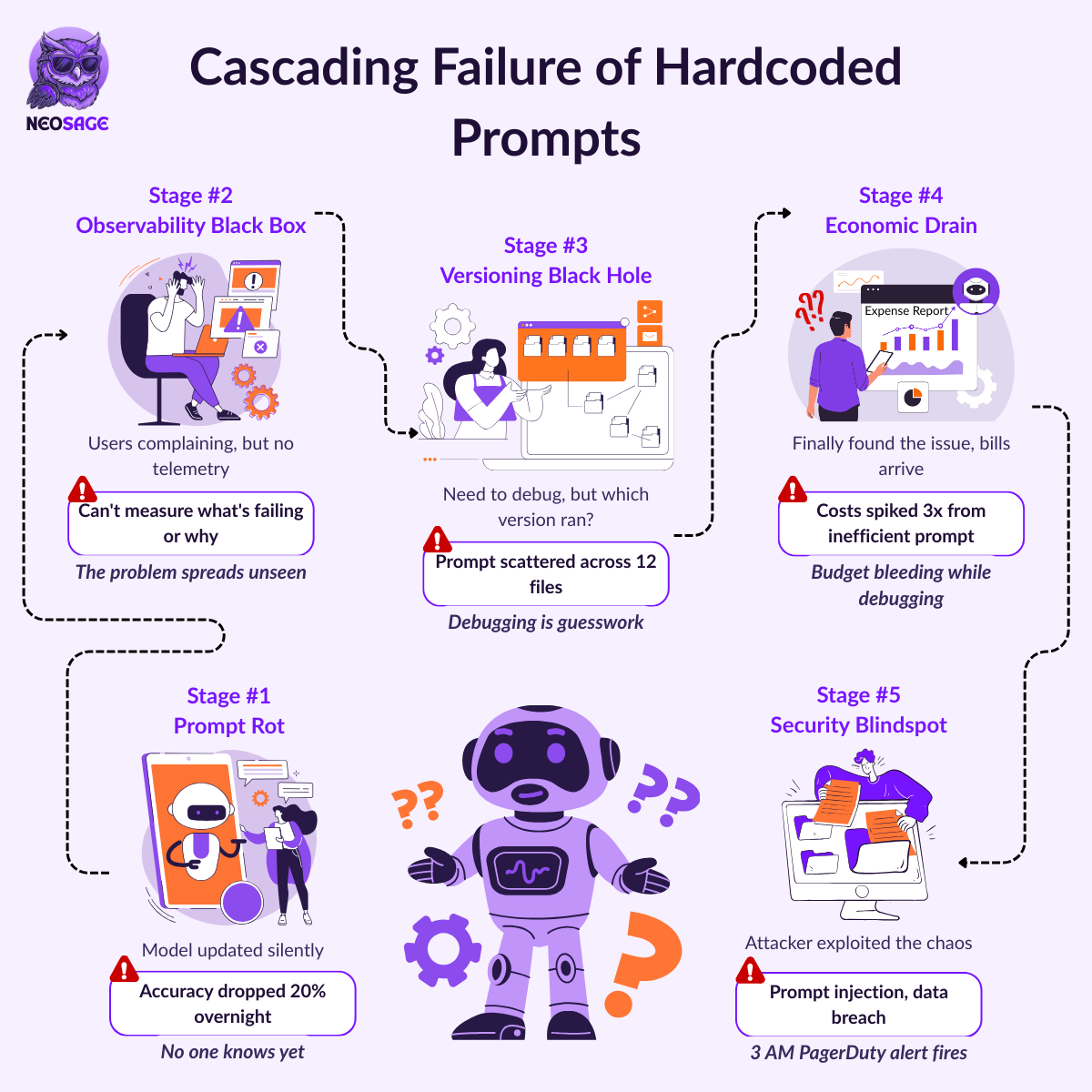
Here’s the pattern: Your new AI-powered support bot is a hit. For a week, it’s the star of your engineering retrospective. Then the 3 AM PagerDuty alert fires. A silent model update broke accuracy. Someone found a prompt injection vulnerability. The cloud bill tripled. And the failing prompt? It’s a raw string, hardcoded in a dozen files, and no one can tell which version was even running.
If this sounds familiar, you’ve hit the most common production landmine: treating prompts like throwaway strings instead of mission-critical infrastructure.
prompt = f"""Extract the user's name, order ID, and the specific issue from this support ticket. Format the output as a JSON object with the keys 'customerName', 'orderId', and 'issueSummary':\\n\\n{support_ticket_text}"""
Here’s why that single line of code is a ticking time bomb:
Prompt Rot: Your prompt’s behavior is tightly coupled to a specific model version. When the provider updates the model (which they do, constantly), the subtle patterns your prompt relied on can shift, causing performance to decay silently. The prompt “rots” without any code ever changing.
The Versioning Black Hole: When a failure occurs, can you definitively say which prompt version was responsible? Without a versioning system, debugging is guesswork. You can’t roll back, and you can’t reliably reproduce successes.
The Observability Black Box: Is a prompt slow? Is it expensive? Is it consistently failing for a specific user segment? When your prompt is just a string, it has no telemetry. You’re flying blind, unable to track latency, token costs, or quality scores.
The Economic Drain: Hardcoded prompts are rarely optimized. They’re bloated with unnecessary verbosity or inefficient few-shot examples, leading to higher token counts that bleed your budget, one API call at a time.
Security Blindspots: A raw, unvalidated string passed to an LLM is a security vulnerability waiting to happen. With prompt injection, a malicious user overrides your instructions. It is not a theoretical threat. It happens when you treat user input as trusted text.
This is a systems engineering problem. And it demands an engineering solution.
The Systemic Solution: The Prompt Lifecycle
So, what does the solution look like in practice?
Treat prompts like critical software artifacts. Version them. Test them. Monitor them. We solved this for our application code decades ago with DevOps. The chaos of ad-hoc prompt management is not a new type of problem; we’re just dealing with a new type of artifact. The solution, therefore, is to apply the same battle-tested engineering discipline.
Welcome to the Prompt Lifecycle.
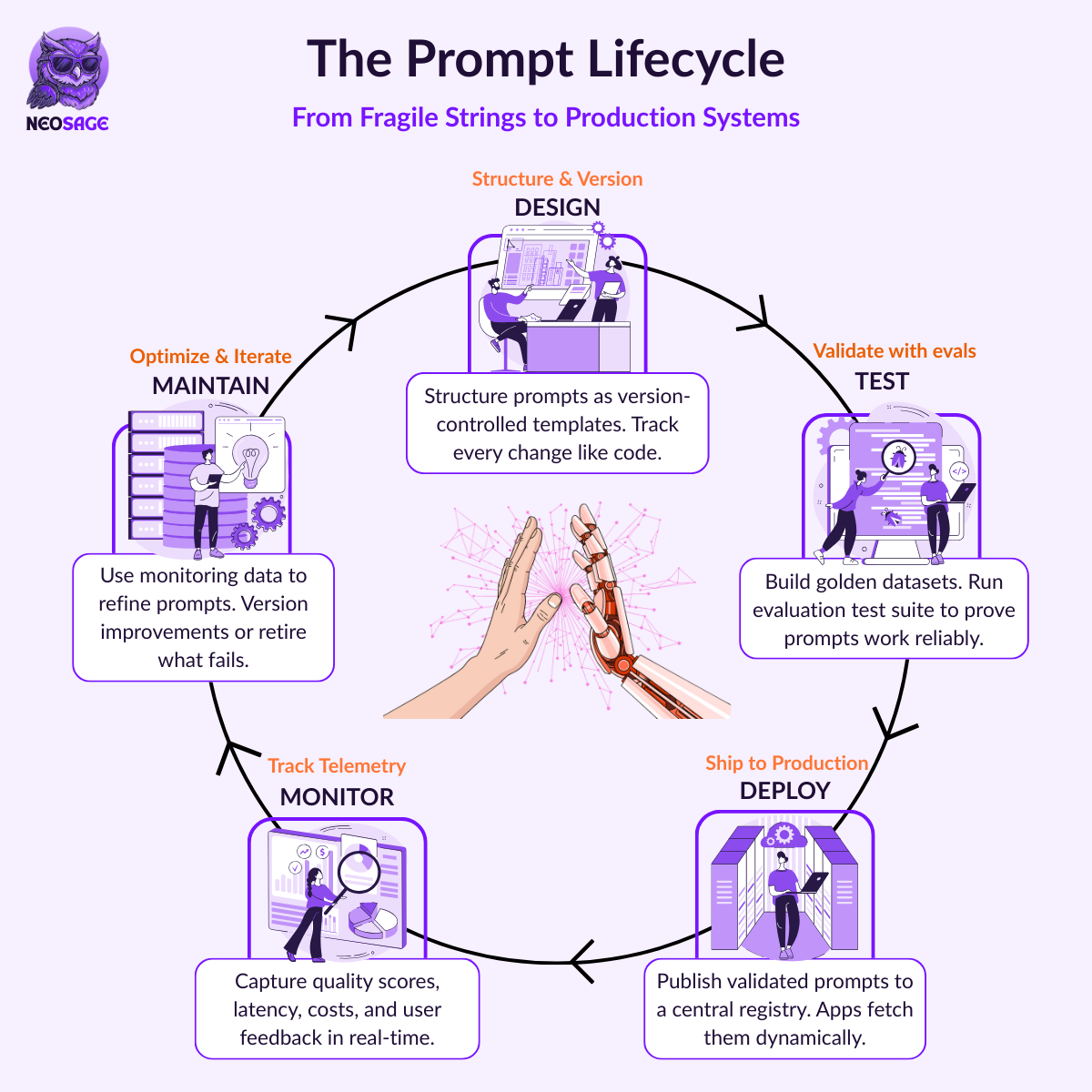
This is the core mental model for shifting from fragile strings to a production-grade system. It’s a continuous, circular process for managing prompts with the same rigor as any other piece of your infrastructure. It consists of five distinct, non-negotiable stages:
Design: This is where you define the prompt not as a raw string, but as a structured, version-controlled asset. You use templates to separate logic from data and a clear schema to define its metadata, parameters, and target model.
Test: Before a prompt ever sees production traffic, it must pass a rigorous, multi-layered evaluation suite. This is where you move from a subjective “looks good” vibe check to data-driven proof that the prompt is effective, reliable, and safe.
Deploy: Once validated, the prompt is published to a centralized Prompt Registry. This creates a single source of truth, allowing your applications to fetch specific, versioned prompts dynamically without requiring a full code deployment.
Monitor: After a prompt is live, you need eyes on it. This stage is about collecting critical, real-world telemetry, such as tracking latency, token costs, and quality scores to understand how the prompt is actually performing in the wild and to catch regressions before they become incidents.
Maintain: The lifecycle doesn’t end at deployment. Based on monitoring data and new business requirements, prompts are versioned, improved, or gracefully retired. This is the feedback loop that ensures your system evolves and adapts over time.
This five-stage loop transforms your process from a linear, fire-and-forget task into a sustainable, continuous improvement cycle. It’s the engineering foundation for building with AI, not just dabbling in it.
Today’s issue breaks down the engineering lifecycle for production prompts. It’s one piece of a much bigger puzzle: building production AI systems that actually work.
If you’re looking for a structured and hands-on way to step into AI engineering, the Engineer’s RAG Accelerator is for you. Check it out here:
Now, let’s get back to our prompt system.
Design & Development: Crafting Maintainable Prompts
The Prompt Lifecycle begins with Design. And let’s be clear: this isn’t a creative writing exercise; it’s an architectural one. We’re going to transform a brittle string into a robust software artifact by giving it a formal, enforceable structure.
This structure has three essential components.
Component 1: Decouple with Templates
First, we kill the “String-in-Code” anti-pattern by separating the prompt’s static logic from its dynamic data. A template engine like Jinja2 is the standard tool for this job. It lets you build prompts that contain logic (for example, in the code below “if output_format is ‘detailed’ then request these fields”), while the application code is only responsible for providing the data (such as support_ticket_text, output_format).
This is a clean separation of concerns. The application handles what data to send; the template handles how that data is presented to the model.
Component 2: Define a Formal Schema
Next, we elevate the prompt from a loose text file to a true, self-describing artifact. We do this by defining it in a structured YAML file, which bundles the template itself with a rich set of auditable metadata.
This schema is the canonical definition of your prompt. It’s the manifest. You can optionally enforce it with validation libraries like Pydantic to guarantee that every prompt in your system is a well-defined, predictable asset. This YAML file becomes the single source of truth for your prompt’s structure and requirements.
A professional prompt definition looks like this.
# summarize_ticket.v1.yaml
# ══════════════════════════════════════════
# METADATA: Describes the prompt artifact
# ══════════════════════════════════════════
name: SummarizeSupportTicket
description: "Generates a concise summary of a user support ticket for internal review."
version: 1
tags: ['support', 'summarization']

input_variables:
  - support_ticket_text
  - output_format # Can be "detailed" or "summary"

execution_settings:
  model: "claude-3-opus-20240229"
  temperature: 0.5
  max_tokens: 512

# ══════════════════════════════════════════
# TEMPLATE: The actual Jinja2 prompt logic
# ══════════════════════════════════════════
template: |
  Your task is to extract information from the following support ticket.
  Support Ticket: {{ support_ticket_text }}

  {% if output_format == "detailed" %}
  Please format the output as a detailed JSON object with the following keys: 'ticketId', 'customerEmail', 'submittedAt', 'productTier', and 'fullIssueDescription'.
  {% elif output_format == "summary" %}
  Please format the output as a compact JSON object with only the following keys: 'ticketId' and 'issueSummary'.
  {% endif %}
Suddenly, your prompt isn’t a guess; it’s a specification. It has a name, a version, explicit inputs, and the exact model settings it was tested against.
Component 3: Establish Version Control
Finally, and this part is non-negotiable: these .yaml files are committed to Git.
This gives your prompts the same safety net you have for every other critical piece of your infrastructure: a complete audit trail (git blame), safe rollbacks (git revert), and a clear comparison between versions (git diff). If your prompt isn’t in version control, it doesn’t exist.
With these three components, you’re no longer wrestling with a hardcoded string. You have a structured, versioned, and auditable software artifact.
Now, let’s go prove it actually works.
Testing & Evaluation: From "Looks Good" to "Provably Good"
Hope is not a testing strategy.
Now that you have a structured, versioned artifact, how do you prove it’s any good? In conventional engineering, the answer is a test suite. For prompts, the discipline is the same, but the methods are new. It’s time to move from a subjective “looks good to me” spot-check to a rigorous process that proves your prompt’s quality with data.
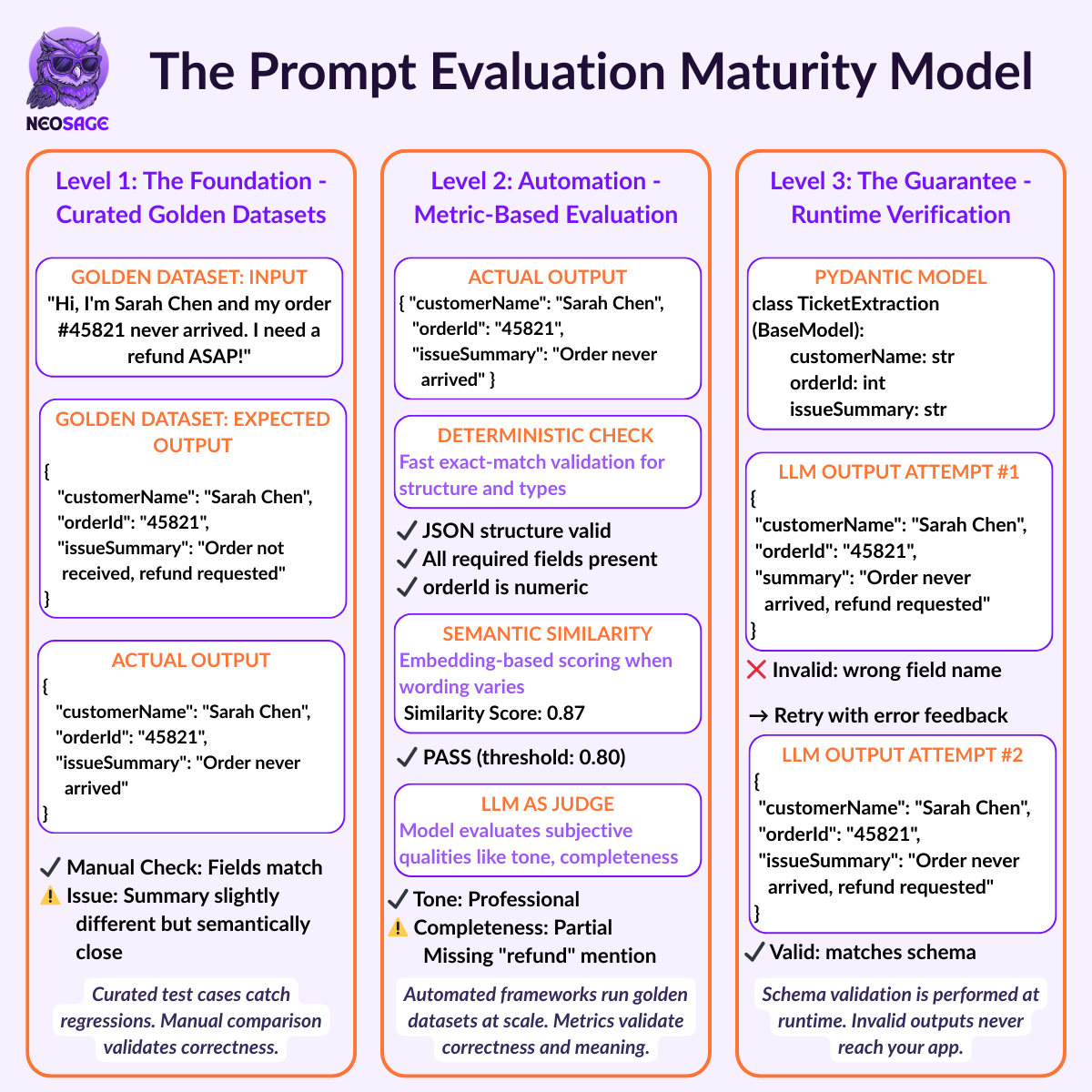
The most effective way to do this is to adopt an Evaluation Maturity Model. Think of it as a three-level roadmap, starting with a simple foundation and building towards a state of automated, runtime guarantees. As the “Prompt Evaluation Pyramid” shows, each level provides a new layer of confidence.
Level 1: The Foundation - Curated Golden Datasets
This is where every professional testing strategy begins. You create a “golden dataset”: a curated collection of diverse, representative inputs and their corresponding, ideal outputs. These are the canonical benchmark for your prompt. When you draft a new version, you run it against the golden inputs and compare the model’s output to your ideal answer.
The Golden Dataset Reality: Golden datasets require knowing what “correct” means for your specific task.
Tasks with exact answers: Easy to verify
Examples: Classification (“Is this spam?” → Yes), extraction (“Pull order_id from receipt” → “12345”)Tasks with quality criteria: Need defined rules
Examples: Summarization (“under 100 words, captures main points”), rewrites (“professional tone, preserves facts”)Tasks depending on context: Hardest to evaluate
Examples: Customer support replies (tone varies by sentiment), recommendations (depend on user history)
This is your essential safety net for catching regressions. Skip this and you have no way to measure if your changes help or hurt.
Level 2: Automation - Metric-Based Evaluation
Now you have a golden dataset. Automate the comparison. Evaluation frameworks like Ragas or DeepEval run your prompts against your golden dataset and calculate quantitative scores using different metric types:
Deterministic: Exact match checks
Fast, catches obvious failures.
Example: Does output[“order_id”] match expected? Is JSON structure valid?Semantic: Meaning match when wording varies
Works for summarization, Q&A, any tasks where meaning matters more than exact wording.
Example: “Meeting is on Monday” vs “Monday is the meeting date” - same meaning, different words. Embedding similarity scores this.LLM-as-a-Judge: Subjective quality (tone, helpfulness, conciseness)
Example: Score “Is this professional?” for customer emails.
Warning: LLM judges are biased (prefers longer outputs, own model family). Trust output as signal, not truth.
Level 3: The Guarantee - Runtime Verification
Enforce output structure at runtime, before it hits your downstream systems.
Libraries like Instructor integrate with Pydantic. You define your output schema as a Pydantic model. Instructor forces the LLM output to conform to that schema, acting as a gatekeeper. If validation fails, it re-prompts with the error.
This ensures your application only receives valid, structured output. No more hoping for clean JSON - you guarantee it.
By progressing through these three levels, you transform your evaluation process from a hopeful guess into an engineering discipline. You build a system to prove that your prompts work, every time.
Deployment & Monitoring: Shipping and Observing Prompts in the Wild
So, your prompt artifact passed every test in the lab. What happens when you throw it into the chaos of a real production environment?
A passing test suite proves your prompt works. It doesn’t prove it survives production. Models drift without warning. Users send unexpected inputs. Latency spikes. This section covers the infrastructure you need: deployment pipelines, monitoring systems, and rollback controls.
This system has four key components.
Component 1: The Prompt Registry
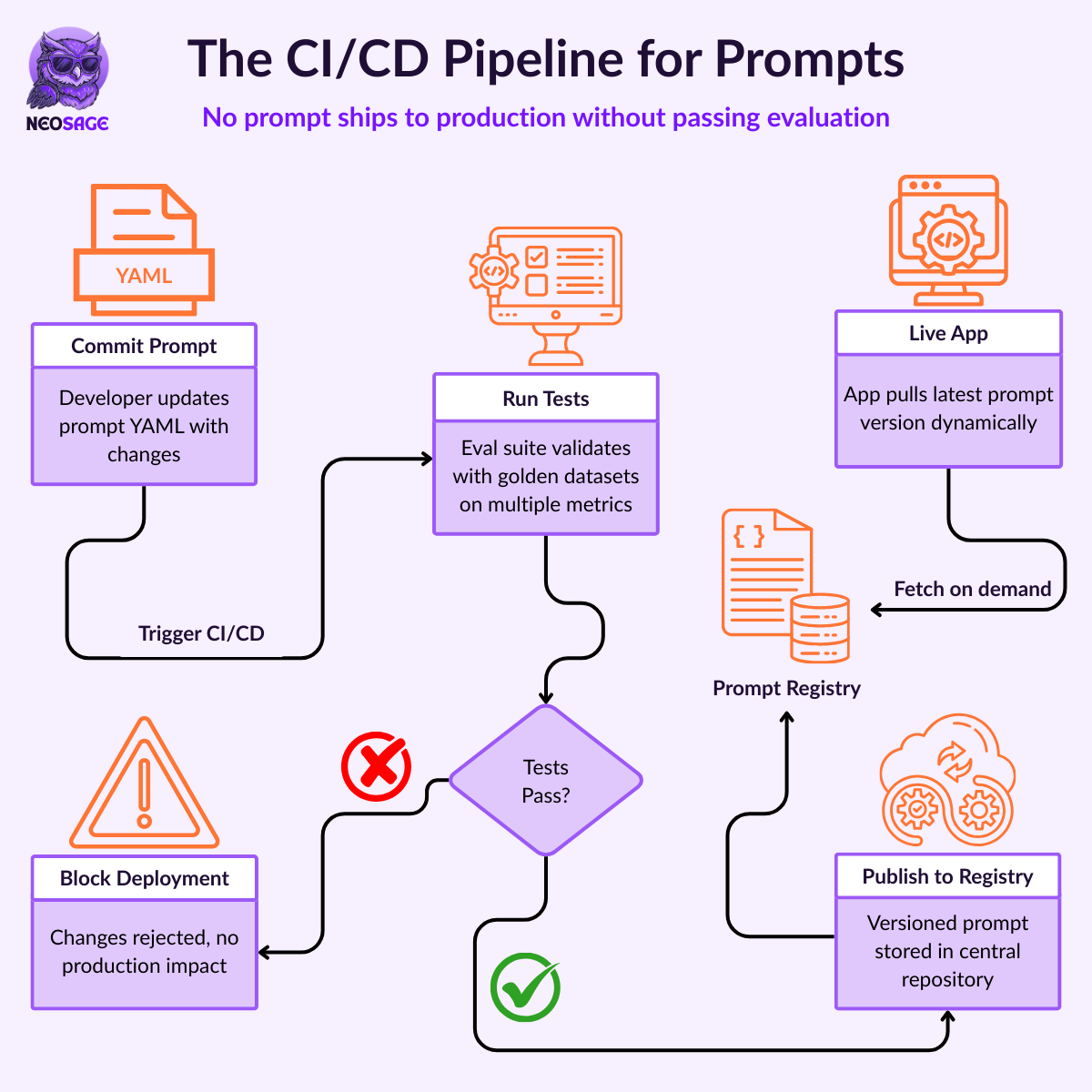
First, you need a single source of truth. A Prompt Registry is a centralized, versioned repository for your validated prompt artifacts. Instead of your application reading a local .yaml file, it fetches the prompt directly from this registry at runtime.
This is a critical decoupling step. It means you can update a prompt without having to redeploy your entire application. Tools like LangSmith or PromptLayer provide managed registries, but you can also build one with a simple web framework (FastAPI with a database like PostgreSQL). The principle is what matters: a centralized service that serves versioned prompts over an API. Your application code asks for SummarizeSupportTicket:v2, and the registry delivers it.
Component 2: The CI/CD Pipeline for Prompts
With a registry in place, you can automate deployment. This is the CI/CD pipeline for prompts.
On commit to a prompt file, your pipeline runs the tests from Section 4. If they pass, it publishes the validated artifact to your Prompt Registry. If they fail, the change is blocked. No prompt reaches production without passing evaluation.
This decouples prompt updates from application deployments. Each can evolve independently.
Component 3: The Observability Framework
Shipping is not the end of the journey. Once your prompt is live, you need eyes on it. An Observability Framework gives you a real-time dashboard to answer critical questions about your prompt’s performance in the wild.
Using emerging observability frameworks like OpenTelemetry, you can track key metrics for every prompt execution:
Performance: What is the end-to-end latency?
Cost: How many tokens is this version using? Is it bleeding your budget?
Quality: What are its real-world quality scores? Are you seeing a drift or regression in performance?
User Feedback: What’s your approval rate? Are users flagging bad outputs?
Without this data, you’re flying blind. With it, you can spot regressions before they become incidents and make data-driven decisions about which prompts to optimize or retire.
Component 4: Safe Rollouts with A/B Testing
Finally, a mature system never rolls out a new prompt version to 100% of users at once. You de-risk the deployment by using A/B testing.
By integrating your application with a feature flagging tool, you can configure it to fetch different versions of a prompt for different user segments. For example:
90% of users get the trusted
v1ofSummarizeSupportTicket.10% of users get the new
v2.
You then compare the observability data for both versions side-by-side. If v2 is cheaper, maintains quality, and user feedback stays positive, you can gradually roll it out to all users. If it causes a spike in errors, you can kill the feature flag instantly, rolling everyone back to v1 without a single line of code being deployed. This is how you iterate with confidence, not just hope.
Builder's Takeaway: From Prompt Janitor to Systems Architect
A 3 AM PagerDuty alert from a hardcoded string. An autonomous system that optimizes its own prompts. That’s the gap this playbook bridges.
That transformation requires rethinking your role. You’re not a prompt writer. You’re a systems architect.
The prompt string is a disposable implementation detail. The valuable asset is the infrastructure around it: the system that can test, deploy, and monitor prompts at scale.
So here’s a heuristic for your next code review: treat every hardcoded prompt as a high-severity bug. This week, find one critical prompt living as a raw string in your codebase. Give it a home in a version-controlled .yaml file. Write one golden test case for it.
That first step establishes the foundation for a production-grade system.
The future of AI engineering is building systems that manage prompts, not perfecting individual prompts.

That one ‘perfect’ prompt you spent a week on? It doesn’t scale. The system you should have built does.
Stay Dangerous. Hoot.
If this issue changed how you think about prompts in production, drop a heart or leave a comment. That’s the only way I know this landed.
And if you’ve been wanting to go deeper than newsletters can take you, to actually build, evaluate, and deploy production AI systems with a structured curriculum and a community of senior engineers... that’s what the Engineer’s RAG Accelerator is for.
6 weeks. Hands-on. Learn alongside engineers from Microsoft, Amazon, Adobe, Visa, and more (that’s where our previous cohort’s engineers came from).
Our last cohort sold out in a week. The waitlist for the next cohort is open. Join now for early bird access when enrollment opens.
References & Further Reading
Ready to go deeper? Here are the tools and frameworks to continue your journey from prompt writer to systems architect.
Core Tooling & Templating
Jinja2: For prompt templating.
Pydantic: For data validation and defining schemas.
Instructor: For getting structured, validated output from LLMs.
Evaluation Frameworks
Ragas: For LLM evaluation, particularly in RAG systems.
DeepEval: A pytest-like LLM evaluation framework.
Observability & Management
OpenTelemetry: Emerging open standard for LLM observability.
Advanced Patterns
DSPy: For programmatic, self-optimizing prompting.